Coming soon
Yomu Craft
Try it
Stories you can play.
Games made with Yomu Craft run in any browser — nothing to install. Here's a tiny one. Explore the tower, and see if you can reach the top.
Some doors only open if you've found what they need.
What it does
No engine. No code.
Yomu Craft is a program for writing and publishing interactive text adventures. Write your story, shape it into chapters and scenes, and turn it into a game anyone can play — no code, no game engine.
Branching made simple
Ask a question, offer choices, and send readers down different paths — side routes, secret passages, multiple endings. Even links hidden inside a sentence.
Dialogue & characters
Give every character a name and a voice. Your cast is collected for you automatically, and each speaker gets their own color in the game.
A story that remembers
Health, gold, reputation, secrets — the story keeps track of it all, and reacts: choices unlock, paths appear, scenes change based on what the player has done.
Inventory built in
Keys, potions, clues. Players pick things up, spend them, and carry them around — and the story knows exactly what's in their pockets.
Images, music & FX
Set the mood with scene art, looping music and ambient sound — and punctuate the big moments with screen shakes, flashes and other visual effects.
Share it anywhere
One click turns your story into a game that plays in any browser — ready for the web, itch.io, or wherever you want readers to find it.
The editor
Everything lives in one window.
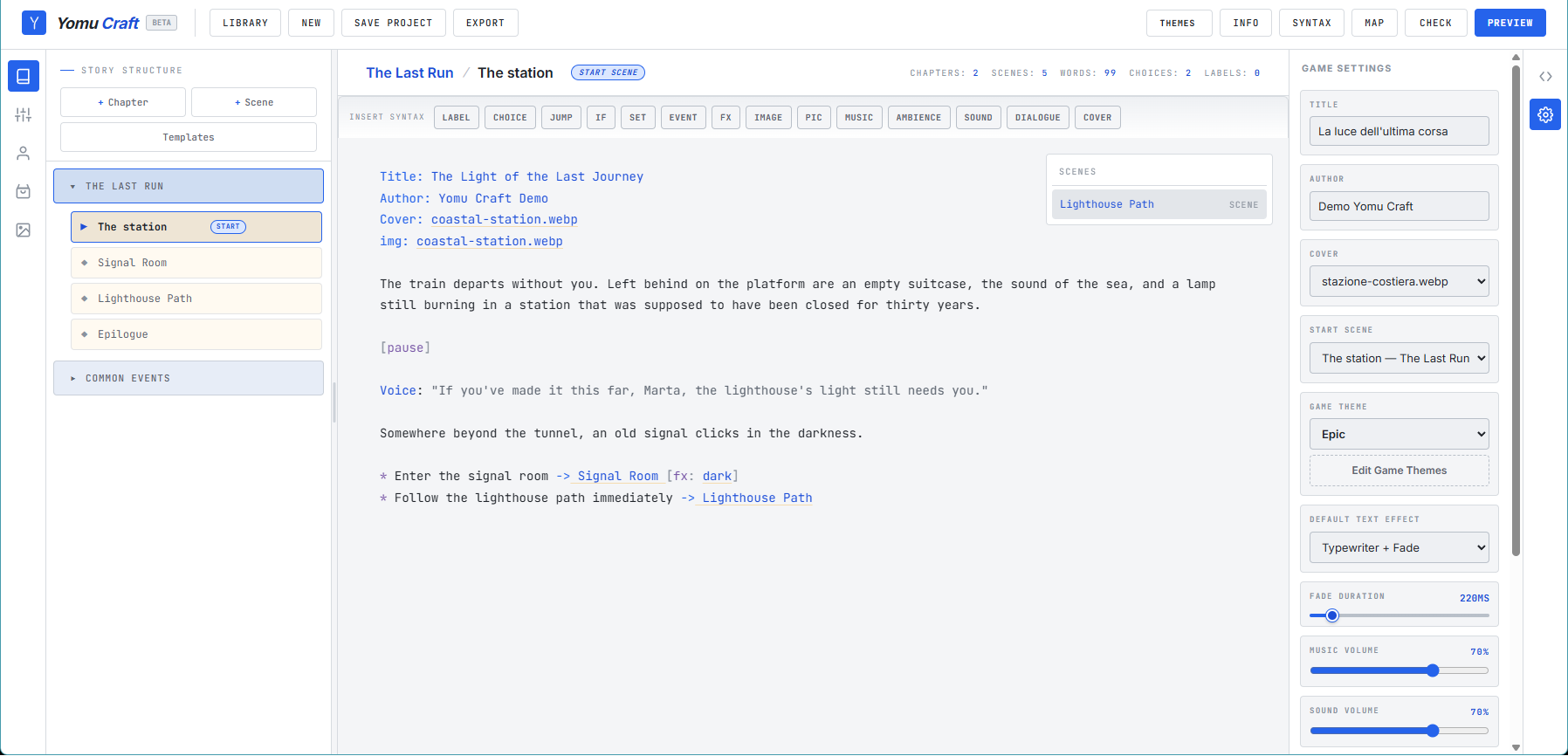
Your projects sit side by side in the Library and everything is saved automatically. Inside a story, the workspace is built around the script.
Startup
Library
Cards for every saved story — cover, title, author, last modified. Create, open, delete, or bring in a project from another machine.
Left
Story tree
Chapters and scenes. Add with + Chapter / + Scene, drag to reorder, right-click to rename or delete.
Center
Writing space
Your story front and center, in a clean distraction-free page — with gentle color-coding and smart suggestions as you type.
Right rail
Built-in help
Never get stuck: contextual hints and examples follow your cursor, so the answer is always right next to where you're writing.
Sidebar
Panels
Story structure, Characters, Items and your images and audio — organized in tidy panels, with drag & drop uploads.
Toolbar
One-click tools
Save, Check, Story Map, Preview, Export, theme menus and Help — the whole pipeline within reach.
Themes
Your story, your look.
Game themes control how your published game looks. Build your own: colors, fonts, text size, button style and more — and watch the result update live as you tweak.
UI themes restyle the editor itself, independently from the game. Custom themes can be duplicated, saved and shared.
Publishing
From draft to shipped.
Before you export, Yomu Craft helps you find what's broken and see the shape of your story.
Story check
One click reviews your whole story: empty scenes, dead ends, missing pieces and more. Click an issue and the editor takes you straight to the right spot.
Story map
A zoomable bird’s-eye view of your story and how its scenes connect — perfect for spotting loose threads. Click any scene to open it.
Preview & export
Preview plays your story inside the editor, exactly as readers will see it. When it feels right, export the finished game — ready for the web, itch.io, or anywhere.